Two Claude Code Mods: A Spend Meter and a Kube Context Picker
Claude Code mods let you change the CLI itself: a row above the prompt, a docked sidebar, a slash command, a guard on tool calls. One of my mods shows what I am spending. The other decides which Kubernetes clusters Claude is allowed to touch and colors them red or green, and the same idea works for databases, logs and any other environment where dev and prod sit side by side.
On this page
I wanted two small things from Claude Code. I wanted to see what a session was costing me without typing /cost, and I wanted to stop wondering which Kubernetes cluster it was about to run kubectl against.
Both turned out to be mods. A mod is a small TypeScript module that Claude Code loads into itself. It can draw in the interface, add slash commands, change the system prompt, and sit in front of every tool call. Here is where I ended up:
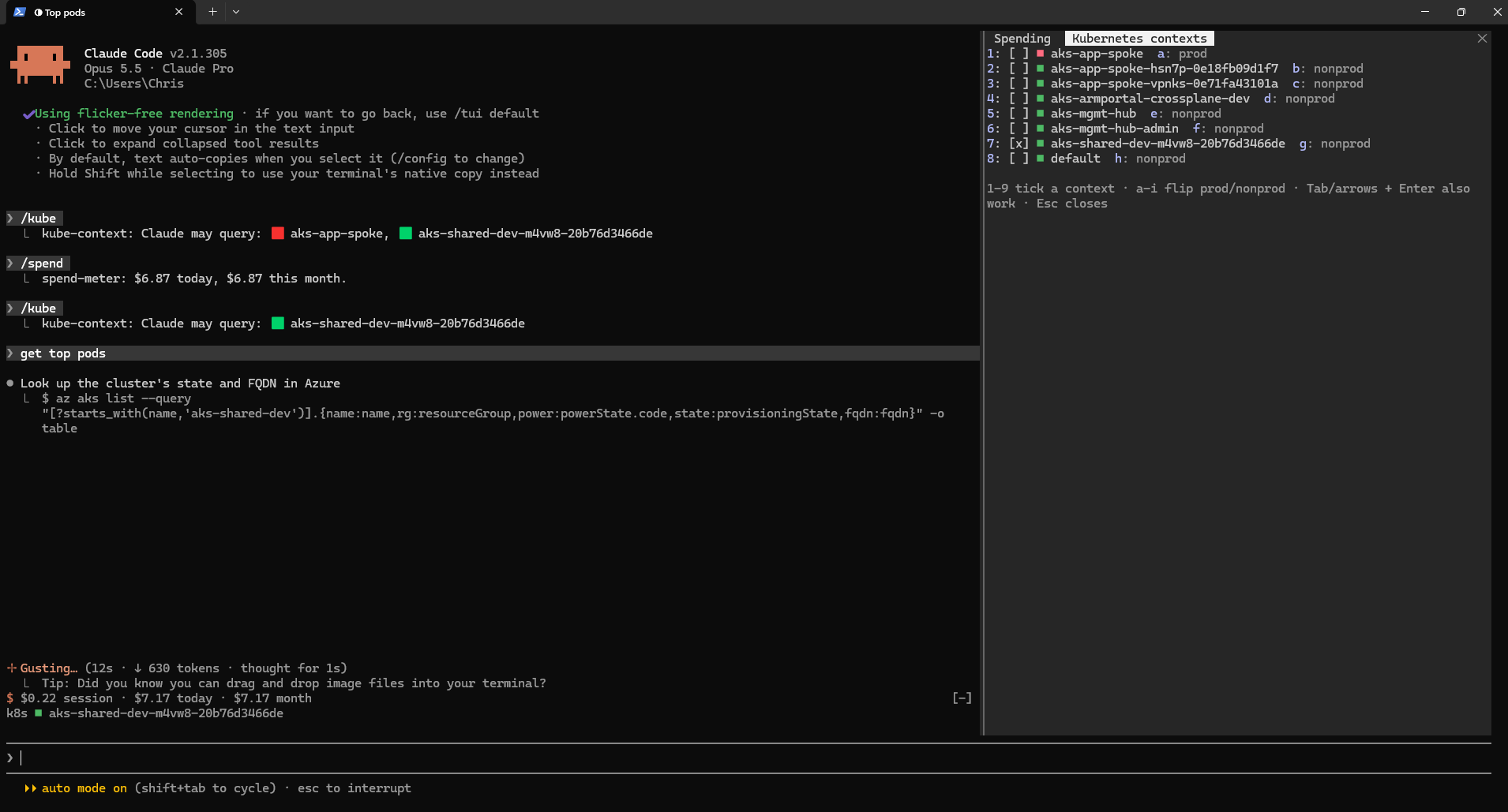
The two rows above the prompt are always there. The sidebar on the right is a docked pane with a tab for each mod. In that screenshot I had asked for the top pods, and the first thing Claude did was look up the one cluster I had ticked.
What a Mod Is
A mod is a folder with three files:
spend-meter/
  .claude-plugin/plugin.json   name, version, description
  hooks/hooks.json             { "modules": ["./register.tsx"] }
  hooks/register.tsx           the code
The module exports one function. It gets on, which registers hooks, and every hook gets $ (the engine), e (the event) and next (whatever would have happened without you):
export const register: Register = on => {
  on('tool.call', { tool: 'Bash' }, async ($, e, next) => {
    // look at e.command, then deny it, rewrite it, or let it through
    return next(e)
  })
}
That one shape covers almost everything. A hook on ui.render draws part of the screen. A hook on prompt.compose edits the system prompt. A hook on command.run answers a slash command. Return without calling next and you have replaced the default. Call next and you have wrapped it.
The module runs in its own sandbox with no Node and no DOM. Anything outside it (files, processes, the clock, storage) goes through $. That felt limiting for about ten minutes, and then it was what made the mods easy to test. The test kit hands you the same $, and you answer the calls beneath it yourself.
While you work on a mod, Claude Code reloads it every time a file changes. I mostly asked Claude to write them, and it would edit the file and the change was live when its turn ended.
Mod One: The Spend Meter
Every session already tracks its own cost. A mod can read it with $.session.usage(), and a session.measure hook fires whenever the cost moves.
The part I actually wanted was the total across sessions. I usually have three or four going, in the desktop app and in a couple of terminals. So the mod keeps a small ledger in $.store, which persists across sessions. It is keyed by session, then by day:
// sessionId -> { '2026-10-20': 2.62, ... }
type Ledger = Record<string, Record<string, number>>
On every update a session writes its running total. Today's amount is the session total minus whatever earlier days of the same session already claimed. That way a session that runs past midnight splits correctly, and writing the same number twice changes nothing. Adding up "today" or "this month" is a sum over the ledger.
/spend opens a pane with the session, today, the last 7 days and the month, a bar for each of the last 14 days, and the 5-hour and weekly rate-limit windows.
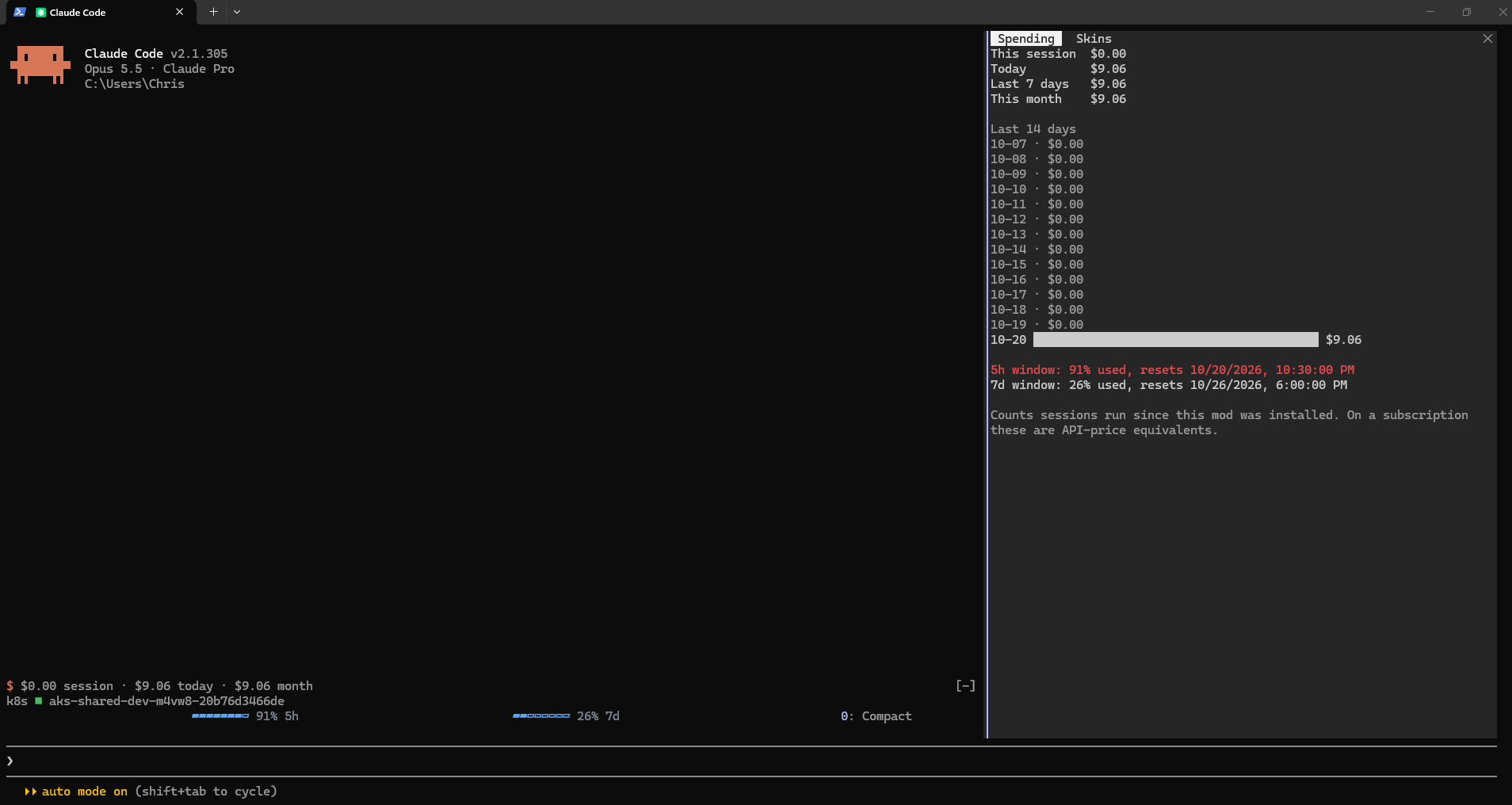
Thirteen empty days and one long bar: the mod only knows about sessions that ran with it loaded, so the history starts the day you install it. The 5-hour window turns red past 80%, which in that screenshot it very much was.
One honest note. I am on Claude Pro, so the dollar amounts are what the same usage would cost at API prices. My bill is the subscription. The rate-limit percentages are the numbers that actually decide when I get throttled, which is why they are in the pane too.
The half exclamation mark
My first version used $.ui.status, which pins a line under the prompt. It worked, but Claude Code draws every mod's status line with a warning sign in front of it, and Windows Terminal cuts that emoji in half:
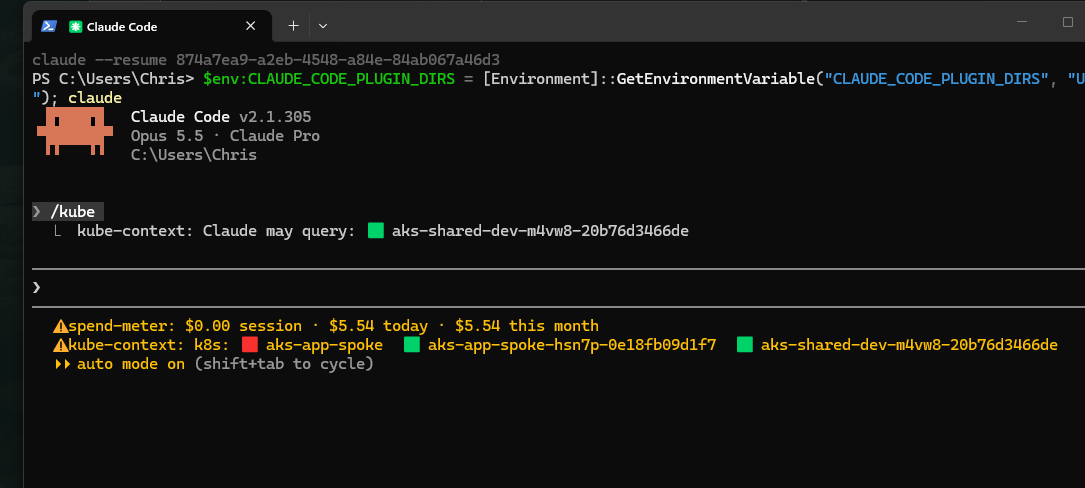
I couldn't figure out how to change that icon, so I modded the layout: both mods now use the band above the prompt (AbovePrompt), where a mod draws its own row. Only one band exists, and every mod that hooks it shares it. So each mod draws its own row and puts whatever next(e) returned underneath. Neither mod knows about the other, and they stack anyway.
Here it is with a third mod in the mix. The spend row and the k8s row are mine. The meters under them, for context, the 5-hour window and the 7-day window, come from claude-skins, which I get to below:

The [-] on the right folds the whole band away, and ctrl+x ctrl+a brings it back:

Mod Two: Which Cluster Is Claude Hitting?
My kubeconfig has collected eight contexts over the past year: a hub, a couple of spokes, a Crossplane experiment, the leftovers of clusters I rebuilt. When I ask Claude to "check the pods", I do not want it reaching for whatever kubectl config current-context happens to be. In my setup a wrong guess costs me a confusing answer. In plenty of setups, the context next to the dev one is production.
/kube reads the contexts from my kubeconfig and shows them as a list. Every context gets a square: green for nonprod, red for prod. The mod guesses from the name, and a key flips it when the guess is wrong. None of my context names say "prod", so they all started green, and I marked one of the spokes red to see what that looks like. Number keys tick the contexts Claude is allowed to use. Both choices are saved, so the next session starts with the same picks.
The first version opened inline above the prompt and could not take the keyboard, so my typing went to the prompt instead:
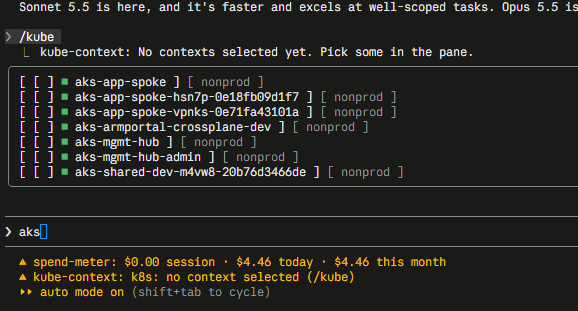
Opening the pane with focus and closeOnEscape turns it into a dialog that takes the keys. And in the fullscreen layout (/tui fullscreen), panes dock on the right instead of opening inline. That is the sidebar in the first screenshot.
Showing the choice is half of it. The other half is making Claude respect it, and the mod does that in two places.
It tells Claude. A prompt.compose hook adds a short section to the system prompt:
Kubernetes: the user has allowed only these kube contexts. Pass --context <name>
(helm: --kube-context) on every kubectl/helm command; never rely on the current context.
- aks-shared-dev-m4vw8-20b76d3466de (nonprod)
- aks-app-spoke (PROD: read-only unless the user explicitly asks for a change)
It checks Claude. A tool.call hook on Bash looks at every command. If it is kubectl, helm, flux, k9s or kustomize, it has to name a context explicitly, and that context has to be ticked:
on('tool.call', { tool: 'Bash' }, async ($, e, next) => {
  if (!KUBE_CLI.test(e.command)) return next(e)
  const picked = (await read($, contexts)).filter(c => c.isSelected).map(c => c.name)
  const named = e.command.match(CONTEXT_FLAG)?.[1]
  if (!named) return { deny: `pass --context explicitly. Allowed: ${picked.join(', ')}` }
  if (!picked.includes(named)) return { deny: `"${named}" is not selected.` }
  return next(e)
})
A denied call goes back to Claude as the tool result, with the reason, so it corrects itself and tries again with the right flag. I never see a prompt for it.
The prompt section and the guard do different jobs. The prompt means Claude usually gets it right the first time. The guard means it does not matter if it doesn't.
What the guard does not cover
Look at the first screenshot again. Before any kubectl, Claude ran az aks list to check the cluster's power state. That went straight through, because az is not on my list. Harmless here. But it shows what this kind of guard is: a pattern match on command text. It catches the mistake of a well-meaning assistant using the wrong context. It will not stop a determined one, and it is not a substitute for RBAC on the cluster. I think of it as a seatbelt, not a sandbox.
The Same Trick for Everything Else
My clusters are the easy case. The more useful version of this mod lives wherever you have a dev copy and a real copy of the same thing, sitting one flag apart. Any time Claude can reach several copies of something, and one of them is the copy that matters, the pattern is the same:
- A visible picker. You choose the targets. They stay on screen, colored by how dangerous they are.
- A prompt section. Claude is told what it may use and how to name it.
- A tool guard. Commands that do not name an allowed target are sent back.
Databases. List the connection profiles from wherever you keep them: a pgpass, a .env per environment, your SQL client's saved servers. Tick orders-dev and orders-staging, leave orders-prod red and unticked. The guard watches psql, sqlcmd and mysql for a host or database flag, and refuses anything without one. For prod you can go further: let SELECT through and send back UPDATE, DELETE and DROP. That is one more regex in the same hook.
Log files and log stores. "Why did checkout fail at 2 a.m.?" has a different answer in every environment, and a confident answer from the wrong one costs you an hour. The picker can hold Log Analytics workspaces, Loki tenants or plain log directories, and the guard checks that az monitor log-analytics query, logcli or a grep under /var/log is aimed at one you ticked. The band above the prompt keeps it honest: if it says logs ■ staging, you know which logs the answer came from.
Cloud environments. Azure subscriptions, AWS profiles, GCP projects and Terraform workspaces all have the same problem as kube contexts: an ambient "current" setting that silently decides where a command lands. The fix is the same too. Require --subscription, --profile, --project or an explicit workspace on every command, and refuse the ones that rely on whatever is currently selected. That closes the az aks list gap above as well.
The common thread is the part I did not expect to value as much as I do. The selection is on screen for both of us. I see a red square before Claude runs anything, Claude reads the same list in its prompt, and the guard holds both of us to it. I stopped asking "wait, which one did you just query?"
Other People's Mods: Diagrams in the Terminal
Mine are small. claude-skins by hellosverre is what a mod looks like when someone takes the drawing side seriously. It redraws Claude Code's tool calls as rows with icons and timings, edits as diff cards, tables as tables, and it comes with fifteen themes you switch with /skin. The part I wanted was the charts: when Claude writes a Mermaid block, skins draws it as a diagram right in the transcript instead of leaving it as code.
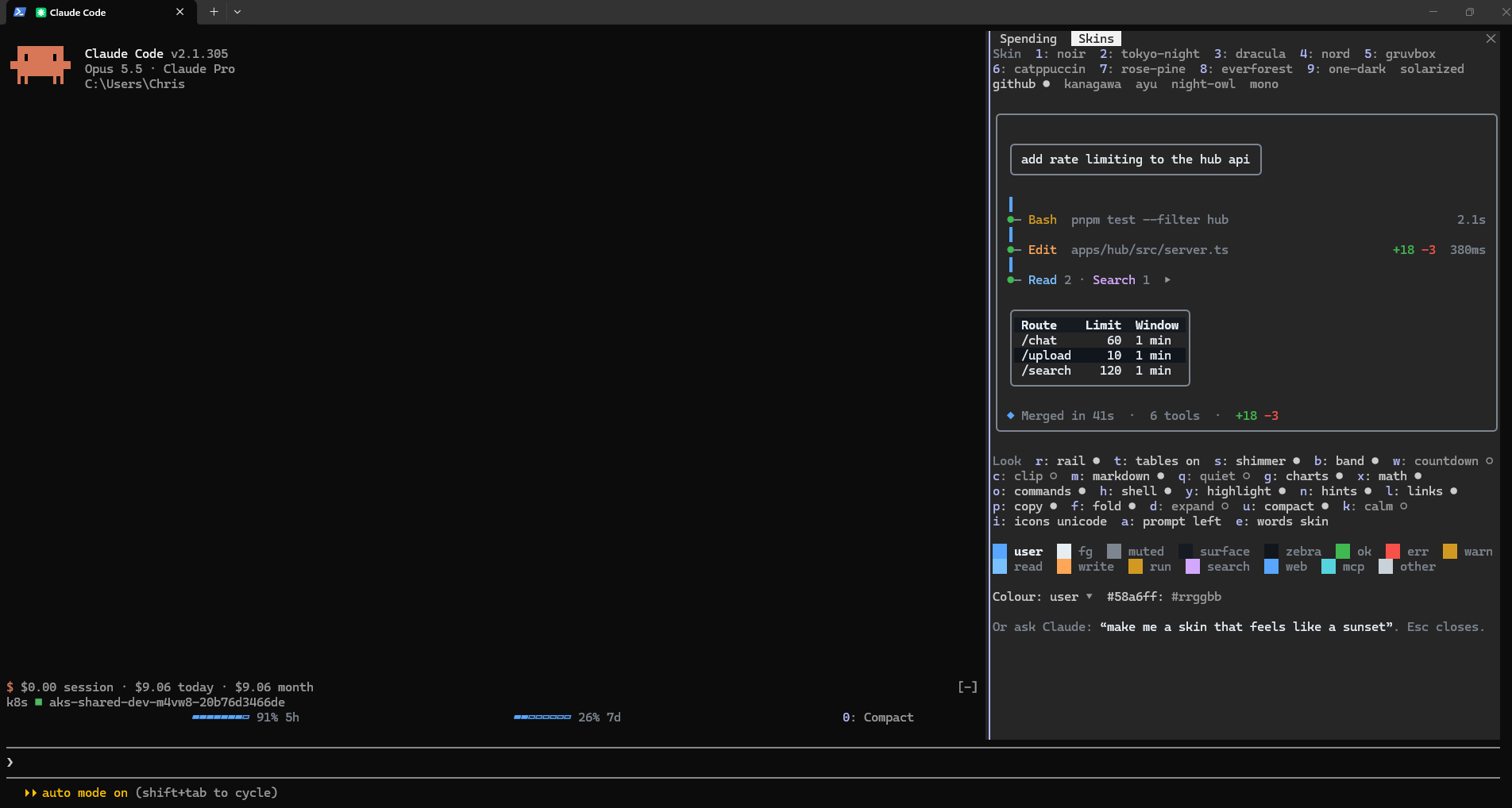
Its settings live in a pane too, so /skin opened as a second tab in the same sidebar as my Spending tab. Number keys pick a theme, letters switch parts on and off, and the card in the middle is a live preview of the current skin:
With charts on, a Mermaid block in Claude's reply comes back as a drawing. I asked for my kube contexts as a pie:
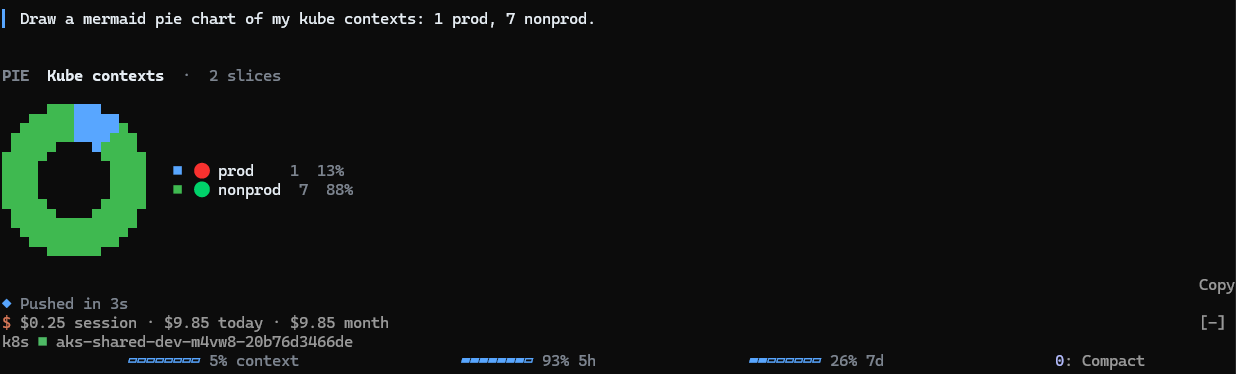
In a terminal, skins draws charts out of character cells: half blocks for the shapes and braille dots for finer lines. The smooth charts in its README come from the desktop app, where the same mod draws SVG cards instead. One mod, two drawings, depending on where it runs. Also note the slice colors come from the skin's palette, so my prod slice is blue. The red and green dots in the legend are emoji Claude put in the labels.
My first attempt was a flowchart of the whole pattern from the previous section, four targets times prod and nonprod times three steps. It came back as rows of boxes, because skins falls back to rows when a diagram is too wide for the terminal. Small charts with short labels draw best.
It installs like any plugin: /plugin marketplace add hellosverre/claude-skins, then /plugin install skins@hellosverre-mods. It loads alongside my two mods without either one knowing about the other, which is the thing I like most about how mods work.
Getting Them Into Every Session
I did not set any of this up by hand. Claude writes a new mod into a folder that belongs to the session it was made in, and it loads there. When I opened a fresh claude in PowerShell and my mods were missing, I said so, and Claude copied them to a permanent folder and pointed Claude Code at it with a user environment variable, CLAUDE_CODE_PLUGIN_DIRS. Every new session loads them now, and they still reload when their files change.
Mods are an early-access feature, so claude update first. And for the sidebar, /tui fullscreen with a window at least 110 columns wide. On the normal screen, panes open above the prompt instead.
Several mods load side by side. Each one gets its own row, its own commands and its own tab in the sidebar. There is only one sidebar, though, so two panes are tabs rather than a split. If I want spend and contexts on screen at the same time, the next step is a third mod that reads both of their state and draws a single dashboard. Mods can read each other's state, so that one should be short.
Found this useful?
Comments